Note: This document is obsolete and relates to an earlier open source version of the plugin which is no longer supported.
Please see the home page for up to date information about this product.
...
Arduino for Visual Studio is a small addin for Visual Studio that provides fully featured Arduino Development. (not available in the express version)
Visual Studio developers no longer need to use the Arduino Ide. Instead, we can code and upload to any Arduino microprocessor using Visual Studio.
Some of the documentation on this site might still refer to the previous version. The latest version as of October 2011 should need less documenting because the application is more intuitive.
Existing users should remove or disable their current Visual Micro addin from Visual Studio. Uninstalling the previous Visual Micro addin from windows is also recommended. Some of you will be pleased to know that the new installer/uninstaller configures Visual Studio automatically.
Successful Beta Reports from Users
Windows Xp success with version 10.6+
Windows 7 success with version 10.2+
Windows Vista success with version 10.2+
Windows VM success with version 10.6+
Information
The new version is a complete rewrite offering at least the same functionality offered by the Arduino development tool. The final work is to ensure that we are also Arduino1 compatible which includes support for the new Arduino file extensions.
We now use standard visual studio commands such as F5 build and upload, double click “go to” error, simpler setup .The intellisense is complete and the compile/upload works fully. We can even burn new boot loaders. Support for single or multiple solutions containing single or multiple sketches is included as standard. There is also a new api allowing arduino plug-ins to be created for other development systems.
After installation you will see two new tools bars. A "Serial Ports" tool bar and an "Arduino Boards" tool bar. These bars are permanent until you uninstall the add-in. This means that you can show/hide them as required and that you can also Customise the "width" of the Arduino boards list. Try setting its width to 300px (or less) which is the length of the longest arduino board description. The same commands are duplicated on the "Tools>Arduino" menu should you decide not to use the bars.
Most Arduino options are repeated within the Visual Studio menus and tool bars in the same way that standard Visual Studio commands are repeated. For example the "Build" option is on the Visual Studio "Project" menu and on the "Build" tool bar. The "Add New Arduino Code" is on the Project menu and on the "Add New" button of the "Standard" Visual Studio tool bar.
The Tools>Arduino menu contains options that are always available inside Visual Studio such as Burn Bootloader. The "File>Open>Arduino Project" is also always available. Many other options become available when an Arduino project is active.
Examples
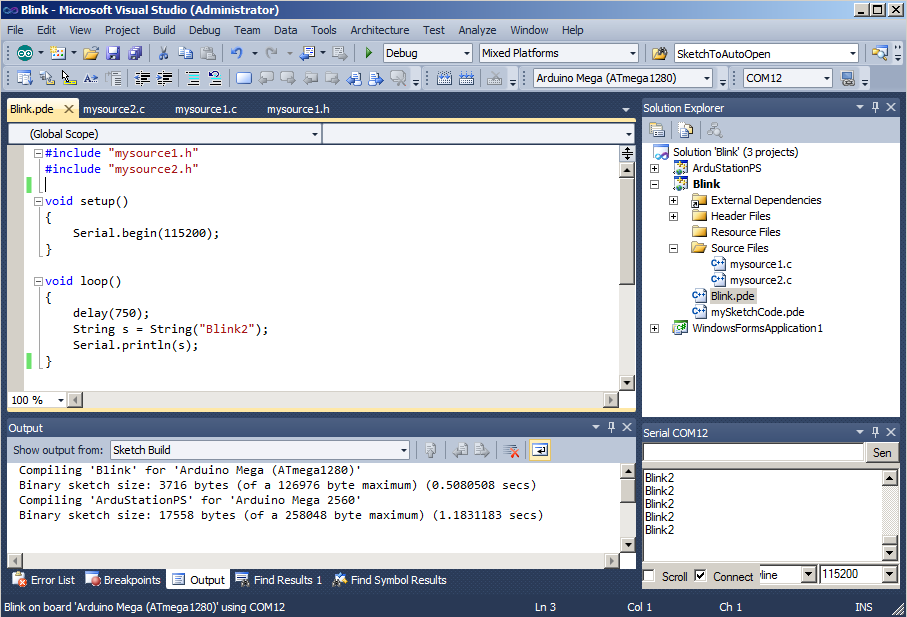
1. Visual Studio with 2 sketch projects and a windows project
Build Solution when Arduino is the Start Up project
2 - Two serial windows
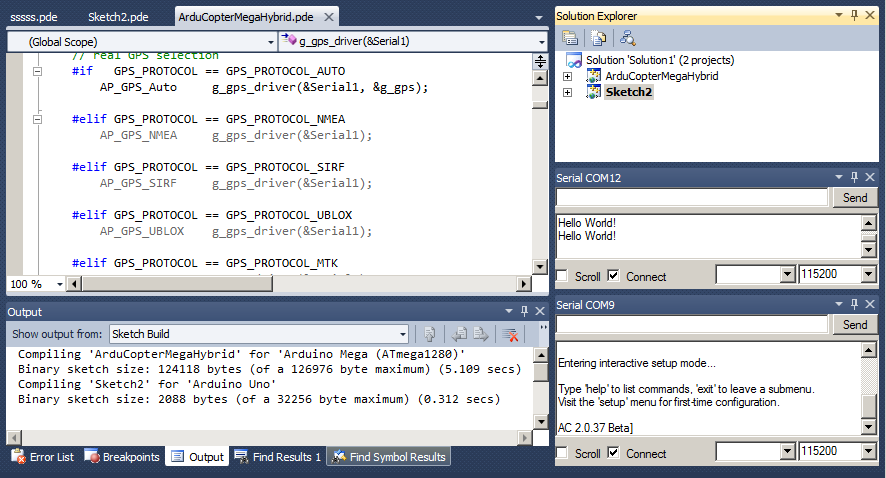
3 - Upload automatic pause of Serial tool

NB: Initially for VS2010. We hope that a VS2008 version will also soon be released. Visual Studio Express is not supported
Thanks to the people at Arduino for making their source code open and to Jeffery Sun for providing the basis of a new installer. Thanks to oVo for his previous documentation and icon suggestions.
Target Audience
Visual Studio professionals
Major Changes
Arduino can be installed in any location. The compiler no longer throws an error when a folder name contains spaces
The compile and upload are now coded using identical methods to the Arduino development system. This means that resulting sketch programs are identical and that any errors encountered during compile will match the errors emitted by the Arduino development system.
The project structure and intellisense are entirely separate to the compiler methods. The _vsaddin folder used by the earlier product version is removed and replaced by a single .[sketchname].arduino.h that is automatically included in all Arduino projects.
When an Arduino library is added to an Visual Studio sketch project the intellisense will not refresh until you click "Save" on the main sketch .pde
By default, _Core and _Lib files are not shown in projects allowing the Visual Studio "Find & Replace" to be used within an Arduino project (be carefull!).
The Visual Studio "Project" menu contains a new command called "Show All Arduino Files". When selected the _Core and _Libs folders will appear containing all additional Arduino files. New users should NOT use this option.
You will find "New Arduino project" on the Visual Studio "File" menu, "Standard" tool bar and "Solution" menu (right click solution in solution explorer). Using these commands ensures sketches are created under the Arduino sketch folder.
The compiler remembers files found in core, libs and sketch folders and uses the information to reduce the amount of compilation work. On average this can reduce compilation times by 400%. The resulting compilation will always be identical to that provided by the Arduino Development tool. You can disabled this feature in the Visual Studio>Tools>Options>Visual Micro>Compiler settings
We recommend showing the Visual Studio "Build" tool bar for single click Arduino compile
After re-installation, if you can not see the arduino board or serial tool bars then close Visual Studio and run the following
devenv.exe /resetaddin Visual.Micro.Visual.Studio.Arduino.Helper
Existing user note! The old visual micro tool bar might be hanging around but empty. Feel free to delete it!